Hardsub vs softsub: what they are and how to tell which one you have
Updated November 7, 2026
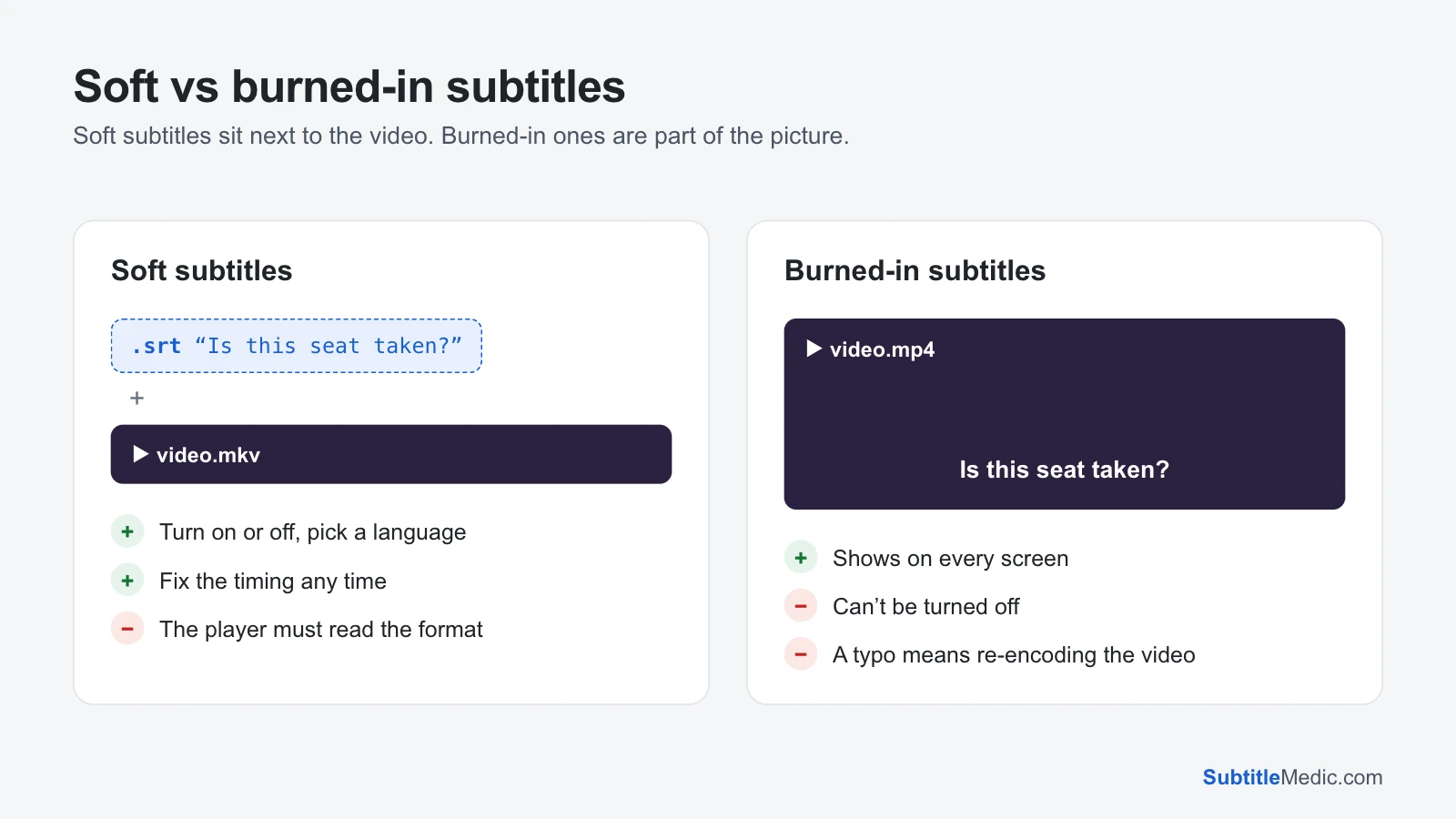
A hardsub is a subtitle burned into the video: the words were drawn onto every frame when the file was made, so they are part of the picture like the actors are. A softsub is a subtitle kept as text beside the picture, either as a separate file such as movie.srt or as a track inside an .mkv or .mp4. You can switch a softsub off, pick another language and fix it. You can't do any of that with a hardsub.
The terms come from fan subtitling, where a release was labelled "hardsub" or "softsub" so people knew what they were downloading. Today they matter whenever subtitles don't behave: the fix depends entirely on which kind you have.
 Open full size (new tab)
Softsubs: a file next to the video, or a track inside it
Softsubs come in two forms, and players treat them a little differently.
- External subtitles are a separate file in the same folder:
movie.mkvwithmovie.srt,movie.en.srtormovie.ass. The player loads them when the names match. You can open the file in a text editor, and every SubtitleMedic tool works on it directly. - Embedded subtitles are tracks stored inside the video container. An
.mkvcan hold many, often SRT text, styled ASS or Blu-ray PGS images; an.mp4usually holds MPEG-4 timed text. You choose them from the player's subtitle menu, the same way you choose an audio language.
Either way the subtitle stays text (or, for PGS and DVD VobSub, a small picture laid over the video), so it can be resized, moved, restyled or replaced without touching the film.
Hardsubs: words drawn into the picture
A hardsub is no longer a subtitle in the technical sense. When the video was encoded, the text was painted onto each frame, then compressed together with everything else. There is no track to turn off and no text to read back.
People burn subtitles in for good reasons:
- The platform can't load subtitle files. Social media clips, messaging apps and many phone galleries play only the picture.
- The look has to stay exactly as designed. Karaoke effects, signs translated in place and fansub styling are often burned in so every player shows them the same way.
- One file is simpler. A single video with the translation in it can't lose its subtitles on the way.
The price: you can't turn the words off, change their size, fix a typo or correct the timing without re-encoding the whole video from a clean copy.
How to tell which one you have
Try these checks in order:
- Look in the folder. A
.srt,.ass,.vttor.subfile with the same name as the video is an external softsub. - Open the subtitle menu. In VLC, choose Subtitle → Sub Track. On a TV or in Plex, open the subtitle or CC option during playback. If tracks are listed, the video has embedded softsubs.
- Turn subtitles off. If the words are still on screen, they are hardsubs.
- Pause on a line and look closely. Hardsubs are blurred and blocky like the rest of the picture, especially in dark scenes. Softsubs stay sharp, because the player draws them at full resolution on top of the video.
- List the tracks. Extract Subtitles from MKV and Extract Subtitles from MP4 show every subtitle track in the file, with its language and format, without uploading the video.
A video can have both: a hardsub for signs and songs, and a softsub for the dialogue.
What you can do with each
With a softsub, almost anything:
- Turn it off, or switch to another language.
- Fix the timing with Shift Subtitle Timing when it is early or late.
- Fix broken letters with Fix Subtitle Encoding.
- Convert it for a device that can't read the format, such as ASS to SRT for a TV.
- Check it against the video in your browser with Subtitle Player.
With a hardsub, very little:
- You can't remove it cleanly. Cropping or blurring the bottom of the picture hides it but damages the image. The real fix is a clean copy of the video plus a separate subtitle file.
- You can cover it with a softsub in another language, using a subtitle with a background box or moved to the top with
{\an8}. - You can get the text back only with OCR software that reads words from video frames, and the result needs proofreading.
Getting softsubs out of a video
Embedded tracks are easier to work with as a file. Extract them first:
- MKV: Extract Subtitles from MKV saves SRT, ASS and PGS tracks. Text tracks come out ready to edit. PGS tracks come out as
.supimages, which need OCR before a text-only TV can show them. - MP4: Extract Subtitles from MP4 turns the timed-text track into a normal
.srt.
The video is read in your browser and never uploaded, so a large film is fine.
Turning a softsub into a hardsub
When you need the words to show everywhere, burn the subtitle in: Burn Subtitles into Video does it in your browser with a preview of the look, and How to add subtitles to a video also covers HandBrake and FFmpeg. Two habits save a lot of re-encoding:
- Fix everything first. Timing, spelling and letters can't be changed afterwards. Play the video with the subtitle in Subtitle Player before you start the encode.
- Choose the look first. A burned-in subtitle keeps whatever style it had. To set a font, size or outline, convert the file with SRT to ASS and burn the ASS file.
Keep the original video and the subtitle file. If anyone finds a mistake later, you burn a new copy instead of living with it.
Questions people ask
Can I remove hardcoded subtitles from a video?
Not cleanly. The words replaced the pixels that were under them, so there is nothing behind them to restore. Cropping, blurring or AI inpainting can hide them, but the picture suffers. Look for a release of the same video without subtitles and use a separate file.
Do softsubs lower the video quality?
No. A softsub is a few kilobytes of text stored next to the picture, and the video is not re-encoded. Burning subtitles in does re-encode the video, which can lose a little quality if the settings are low.
Why doesn't my TV show the subtitles inside my MKV?
Many TVs read SRT tracks but not styled ASS or image-based PGS tracks, and skip them without a message. Extract the track with Extract Subtitles from MKV, convert an ASS track with ASS to SRT, and put the .srt next to the video with the same name.
Which is better for sharing a video?
Softsubs, whenever the place you share to accepts a subtitle file: YouTube, Plex, a USB stick for a TV, or a web page. Use a hardsub only when it doesn't, such as a short clip for social media.
For more on the formats softsubs use, see What is an SRT file? and What is an ASS file?