What is an ASS file? Styled subtitles, SSA, and when to convert to SRT
Updated October 29, 2026
An .ass file is an Advanced SubStation Alpha subtitle: plain text that holds not only what is said and when, but also how it looks. Fonts, sizes, colours, outlines, the exact place on screen, fades and karaoke effects are all written in the file. That is why fan-made anime subtitles can translate a shop sign in the same spot and colour as the original.
It is also why an .ass file plays perfectly in one player and shows nothing, or a mess of codes, in another. This guide shows what is inside, which players can show it, and when it’s better to turn it into SRT.
What is inside an ASS file
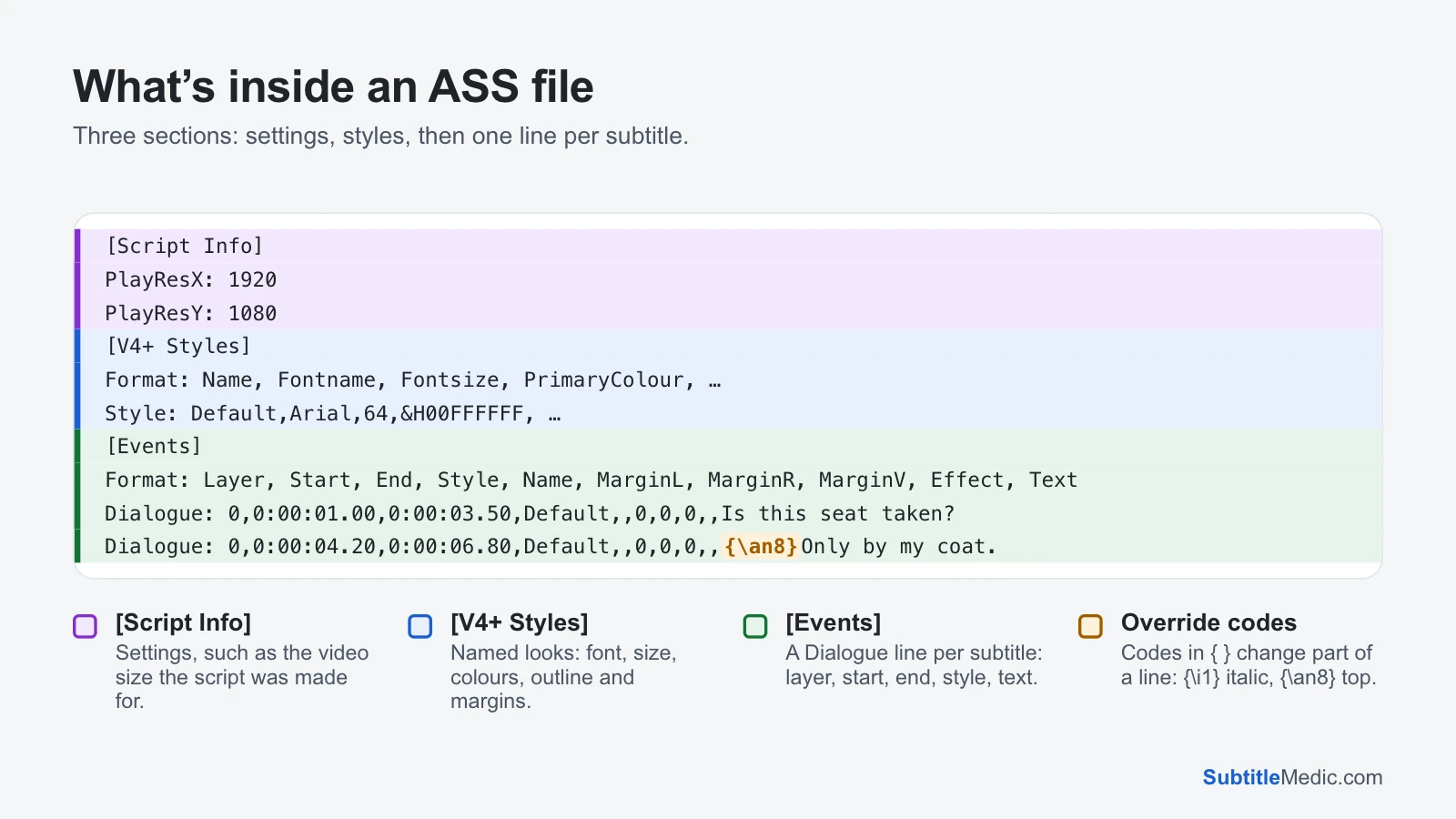
Open an .ass file in a text editor and you see three sections:
 Open full size (new tab)
[Script Info]holds settings. The most important arePlayResXandPlayResY, the video size the subtitles were designed for. Sizes and positions are measured against it, so a 64-point font on a 1080-line script looks the same on any screen.[V4+ Styles]is a table of named styles. AFormat:line names the columns, and eachStyle:line fills them in: font, size, colours, bold, outline, shadow, alignment and margins. Colours are written as&H00FFFFFF, with the transparency first and then blue, green and red, the reverse of the usual order.[Events]holds the subtitles. EachDialogue:line has a layer, a start and end time in hundredths of a second (0:00:01.00), the style it uses, and the text. Lines starting withComment:are never shown; translators use them for notes.\Nin the text starts a new line.
Some files have a fourth section, [Fonts] or [Graphics], with embedded files, but most keep their fonts elsewhere (see below).
Override codes
Inside the text, codes in curly braces change the look for part of a line. The common ones:
{\i1}…{\i0}: italic on and off.{\b1}and{\u1}work the same for bold and underline.{\an8}: put the line at the top centre. The digits follow a phone keypad layout from 1 to 9, with{\an2}at the bottom centre.{\pos(960,120)}: place the line at an exact point, inPlayResX×PlayResYcoordinates.{\fad(200,200)}: fade in and out over 200 ms.{\c&H00FFFF&}: change the colour, here to yellow.{\k40}: karaoke timing, in hundredths of a second per syllable.{\fnArial}: switch to another font.
A player that understands ASS applies these and hides them. One that doesn’t either drops the line or prints the codes on screen.
ASS and SSA: what is the difference
SSA (SubStation Alpha, .ssa) is the original format from the late 1990s. ASS is its successor, version 4+, and is what almost every file today uses. You can tell them apart in [Script Info]: ScriptType: v4.00 is SSA, v4.00+ is ASS, and the styles section is called [V4 Styles] instead of [V4+ Styles].
ASS added layers, so a sign can sit over dialogue, plus more style fields such as underline, strikeout, scaling and spacing, and more override codes. Players and tools that read one almost always read the other, and everything on this site treats them the same.
Where ASS files come from
- Anime and other fan subtitles, where typesetting signs and song lyrics is part of the job.
- MKV video files, which often carry ASS tracks inside them. Extract Subtitles from MKV saves them as separate files.
- Aegisub, the free subtitle editor for Windows, Mac and Linux that most styled subtitles are made in.
- Subtitle sites, which list .ass files next to .srt files for many shows.
What plays ASS files
With full styling: VLC, mpv, IINA on a Mac, MPC-HC and MPC-BE, PotPlayer and Kodi all include a renderer that draws every font, colour, position and effect.
Media servers: Jellyfin’s web app draws ASS itself. Plex and Jellyfin often burn the subtitles into the picture for apps that can’t draw them, which means converting the video on the fly and can make playback stutter on a slow server.
Without styling, or not at all: most smart TVs, phones’ built-in players, game consoles, web browsers and video editors. An HTML5 video player can’t load an .ass file; it needs WebVTT.
Fonts: why an ASS file can look wrong
Each ASS style names a font, such as Open Sans Semibold, but the file doesn’t contain the font itself. If the font isn’t installed, the player uses another one, and the result can be the wrong size, the wrong weight or empty boxes instead of letters.
MKV releases solve this by attaching the fonts to the video file. When you extract the .ass track on its own, those fonts stay behind. To get the original look, install the fonts the styles name, or play the subtitles from the MKV. If you only need readable text, converting to SRT makes the player use its own font.
When to keep ASS and when to convert
Keep the .ass file when you watch in a player that draws it (VLC, mpv, MPC-HC, Kodi) and the styling matters: signs, songs, two speakers on screen at once.
Convert to SRT for a TV, a phone, Plex on a device that stutters, or a video editor: Convert ASS to SRT. The words, timing, italics and bold are kept; fonts, colours and positions go.
Convert to VTT for a website or an HTML5 player: Convert ASS to VTT.
Codes such as {\an8} or {\i1} on screen in an SRT file? It was converted from ASS by a tool that left them in. Remove Formatting from Subtitles removes them and can keep italics.
Going the other way? Convert SRT to ASS gives a plain SRT file a clean default style, ready to restyle in Aegisub.
Converting to SRT can’t be undone, because the styles are gone, so keep the original .ass next to the new file.
How to edit an ASS file
To change the look (fonts, colours, positions), use Aegisub: it shows the video with the styling applied as you edit.
To fix a word or a time, the Subtitle Editor opens .ass and .ssa files in your browser, lists every line with its times, plays your video next to it, and saves it in the same format with its styles untouched.
For how the simpler formats compare, see What is an SRT file? and What is a VTT file?