What is a SUB file? Three formats, one extension
Updated October 30, 2026
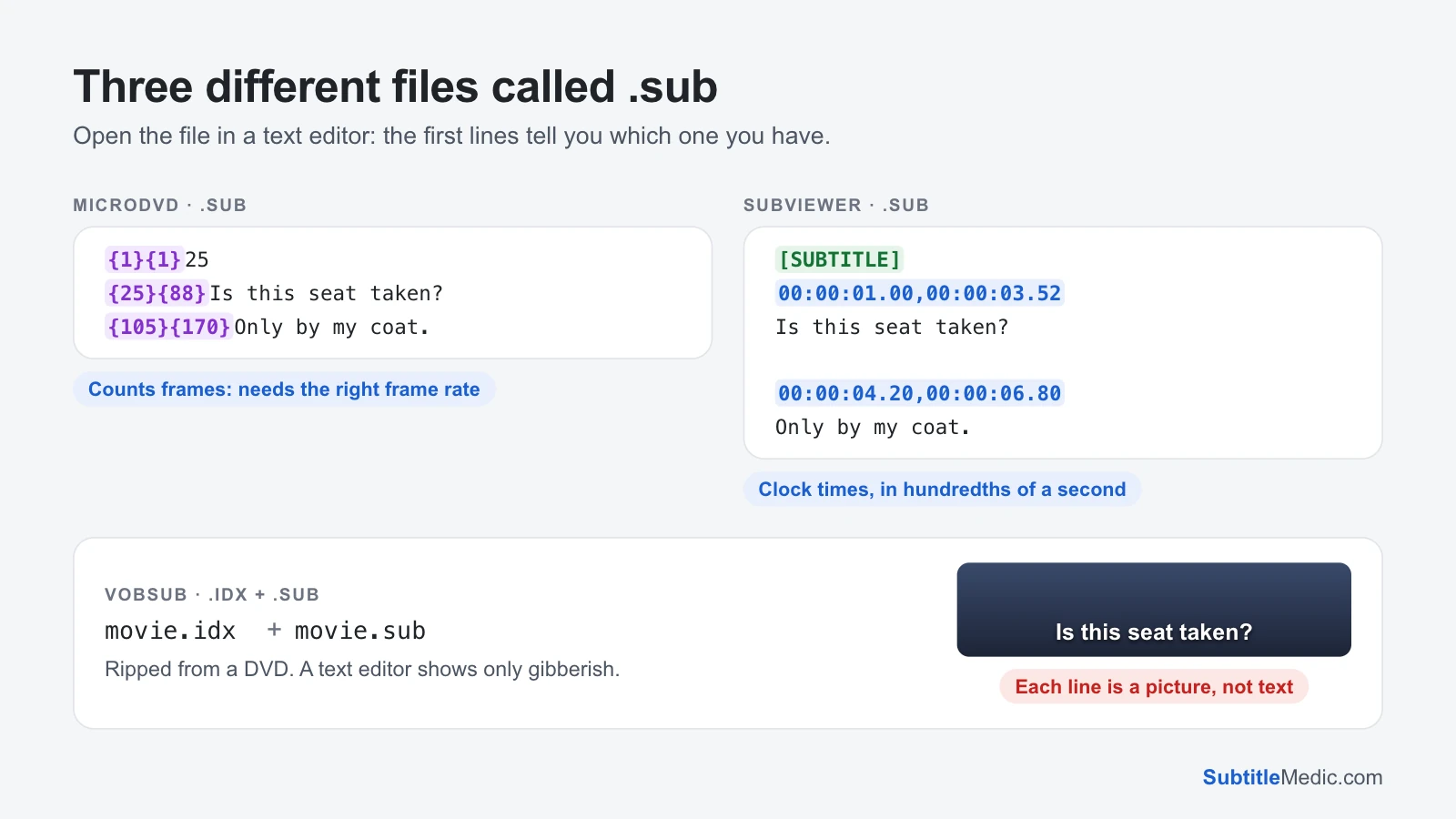
A .sub file is a subtitle file, but .sub is not one format. Three unrelated formats use the same extension: MicroDVD, a text file that counts video frames; SubViewer, a text file with clock times; and VobSub, subtitles ripped from a DVD and stored as pictures, always paired with an .idx file. Which one you have decides what can open it and whether it can become an .srt.
All three date from the late 1990s and early 2000s, when films were shared as DivX .avi files and subtitles were made for them by hand. They still turn up with older films, in DVD rips and in subtitle archives.
 Open full size (new tab)
Find out which .sub you have
Open the file in a text editor: Notepad on Windows, TextEdit on a Mac. The first lines tell you.
- Lines start with numbers in braces, like
{75}{131}Is this seat taken?It's MicroDVD. - An
[INFORMATION]or[SUBTITLE]header, then lines like00:00:01.00,00:00:03.50. It's SubViewer 2.0. - Unreadable symbols, and a file with the same name ending in
.idxbeside it. It's VobSub.
If you are not sure, look at the size too. A text .sub for a whole film is usually 30–100 KB; a VobSub .sub is several megabytes.
MicroDVD: subtitles counted in frames
MicroDVD writes one subtitle per line: the frame it appears on, the frame it disappears on, then the text. A | starts a new line, and codes such as {y:i} make it italic.
The catch is that frames are not times. Frame 75 is 3 seconds into a 25 fps video but 3.13 seconds into a 23.976 fps one. Many files open with a line like {1}{1}23.976 that states the rate they were made for; without it the player has to guess. With the wrong rate the subtitles start in sync and drift further off as the film goes on, by minutes at the end.
That is also why MicroDVD files break when you use them with a different release of the same film. The fix is the same as for any drifting subtitle: convert with the right rate, then stretch the result if needed. Subtitles that don't match the movie explains how to tell.
SubViewer: real times, an old layout
SubViewer 2.0 already stores clock times, in hundredths of a second, so it has no frame rate problem. Its header holds a title and author, [br] marks a line break, and each subtitle is a timing line, its text and a blank line. It is a close relative of YouTube's SBV format (How to open an SBV file), but most modern players no longer read it.
VobSub: pictures from a DVD
DVDs don't store subtitles as text. Each line is a small picture laid over the video. A ripping program copies those pictures into a .sub file and writes an .idx file next to it with the timing, the colours and the language of each track.
- Keep both files together with the same name as the video:
movie.avi,movie.idxandmovie.sub. Without the.idx, players can't show anything. - VLC, MPC-HC, PotPlayer and Kodi play VobSub. Most smart TVs, phones and web players don't.
- You can't edit it as text, and no converter can turn it into SRT by reading it. The letters have to be recognised first with OCR software such as Subtitle Edit, and the result proofread.
VobSub also turns up inside .mkv files as an image track. Extract Subtitles from MKV shows such tracks, along with any text tracks in the same file that may be easier to use.
Open or play a .sub file
- To read it: any text editor, for MicroDVD and SubViewer. VobSub can't be read as text.
- With a video on a computer: VLC plays all three. Give the
.sub(and the.idxfor VobSub) the same name as the video and keep them in one folder. - On a TV, a phone or Plex: text
.subsupport is patchy and VobSub is rare. Convert a text.subto SRT first. - In a browser: Subtitle Player plays a text
.subon your video so you can check the timing before you convert it.
Convert a .sub file to SRT
SRT plays almost everywhere, so converting is usually the simplest fix.
- Open the file in SUB to SRT. It reads both MicroDVD and SubViewer.
- For MicroDVD, check the frame rate next to the file name. If the file states one, it is used; otherwise pick your video's rate (VLC shows it under Tools → Codec Information). Films are usually 23.976, European TV 25.
- Download the
.srt. The file never leaves your browser.
Still drifting after converting? The rate the file was made for may not match your video. Convert with the file's own rate, then stretch the .srt with Change Subtitle Frame Rate. Off by the same amount all the way through? Move every line with Shift Subtitle Timing.
Letters look wrong? Old .sub files are often saved in a Windows code page. Pick the encoding in the converter, or repair the file with Fix Subtitle Encoding.
Questions people ask
Is a .sub file the same as an .srt file?
No. Both are subtitles, but they are written differently. SRT numbers each subtitle and writes times such as 00:00:01,000 --> 00:00:03,500; MicroDVD writes frame numbers, SubViewer writes hundredths of a second, and VobSub holds pictures. Renaming a .sub to .srt doesn't convert it. See What is an SRT file? for how SRT is laid out.
Why does my .sub file come with an .idx file?
That pair is VobSub, copied from a DVD. The .sub holds the subtitle pictures and the .idx says when each one appears and which language it belongs to. Keep the two together and give them the same name as the video.
Can I edit the words in a .sub file?
A MicroDVD or SubViewer file, yes: change the text in a text editor and leave the numbers alone, or open it in the Subtitle Editor, which reads both. A VobSub file, no: the words are pictures, so they have to be recognised with OCR first.
Why are my .sub subtitles in sync at first and late at the end?
It's a MicroDVD file read at the wrong frame rate. Convert it with SUB to SRT and change the frame rate until the last line lands on the last sentence spoken.