SRT vs VTT: the differences, and which one to use where
Updated October 29, 2026
SRT and VTT are the two subtitle formats you meet most. Both are plain text, both hold the same thing (each line of dialogue with the time it appears and disappears), and a file in one can be turned into the other without losing a word or a millisecond. Yet a website refuses your .srt, and your TV ignores your .vtt.
The reason is a handful of small differences, and the places that expect each format. Here is what they are, and how to pick.
The four differences
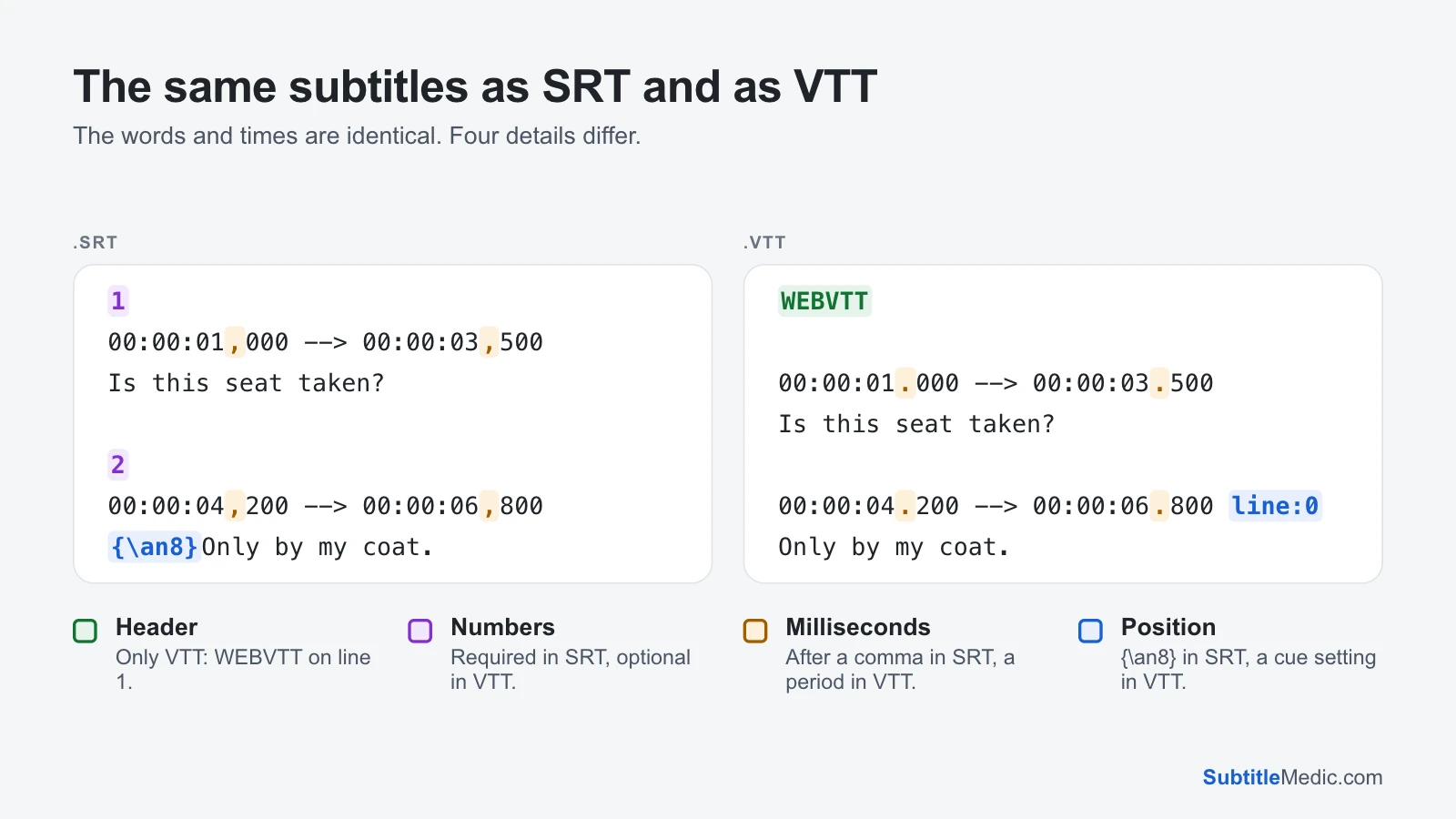 Open full size (new tab)
- The header. A VTT file must start with the word
WEBVTTon its first line. SRT has no header at all. - Numbers. SRT numbers every subtitle from 1. In VTT a subtitle, called a cue, can have a name or number above its timing, but it is optional.
- Milliseconds. SRT writes
00:00:01,000, with a comma. VTT writes00:00:01.000, with a period, and the hours can be left out. - Position. To move a line to the top, SRT files borrow the code
{\an8}from ASS, which most players understand. VTT has cue settings after the times, such asline:0,position:andalign:.
That is why renaming a file doesn’t work. A browser opening a renamed .srt finds no WEBVTT and refuses it; a TV opening a renamed .vtt finds no numbers and often shows nothing.
What only VTT can do
WebVTT was made for web video, so it carries more than timing and text:
- Speakers:
<v Mara>marks who is talking, which screen readers and some players use. - Classes:
<c.yellow>gives part of a line a class that the web page styles with CSS. - Styles and regions:
STYLEblocks hold CSS for the captions,REGIONblocks define areas captions scroll in. - Comments:
NOTEblocks are never shown. - Word timing: tags like
<00:00:02.500>inside a line, which YouTube uses for its automatic captions. - One encoding: VTT files are always UTF-8. SRT files can be in any encoding, which is where most garbled letters in old subtitles come from.
SRT keeps it simple: <i>, <b> and <u> for italic, bold and underline, plus the unofficial <font color> and {\an8} that many players accept. For most films and videos, that is all you need.
Which one to use where
- A website with HTML5 video, or a web player such as Video.js or Plyr: VTT. The
<track>element only accepts WebVTT. - YouTube and Vimeo: either. Both accept .srt and .vtt uploads.
- Facebook and LinkedIn: SRT.
- Smart TVs, media boxes, Plex, Jellyfin and Kodi: SRT is the safe choice. Many read VTT too, but SRT works on every one of them.
- VLC and mpv on a computer: either.
- Video editors: SRT. Premiere Pro, Final Cut Pro, DaVinci Resolve and CapCut all import it, while VTT support varies; Premiere Pro doesn’t import VTT files.
- Translators and subtitle sites: SRT, the format almost every subtitle tool and site uses.
A simple rule: VTT for the web, SRT for everything you play or share. If you need both, keep the one with more in it as the master. A VTT file with positions and speaker names can always produce an SRT; the other way, that information was never there.
How to convert between them
SRT to VTT, for a website: Convert SRT to VTT adds the header, changes the commas to periods and drops the numbers. A line marked {\an8} stays at the top as line:0. Font tags, which mean nothing in VTT, are removed and counted before you download. The result is saved as UTF-8, so check the accented letters in the preview first; if they look wrong, fix the file with Fix Subtitle Encoding before converting.
VTT to SRT, for a TV, a player or an editor: Convert VTT to SRT numbers the subtitles, changes the periods to commas and drops what SRT can’t hold: styles, regions, classes and most cue settings. Lines placed at the top keep their place with {\an8}, and speaker names can be kept as “Mara: …” at the start of the line. YouTube’s automatic captions are unrolled, so each sentence appears once instead of two or three times.
Both run in your browser. Your file is read on your device and never uploaded, and the timing doesn’t change by a single millisecond.
Quick fixes for common problems
The website says the .vtt file is invalid. Check that WEBVTT is the very first line, with nothing before it. A file that is really SRT with a new extension fails here.
The TV shows {\an8} or <font color=…> on screen. It printed a code it doesn’t understand. Remove Formatting from Subtitles clears the codes and can keep italics.
Every line appears two or three times after downloading from YouTube. Those are rolling automatic captions. Converting to SRT unrolls them.
For a closer look at each format, see What is an SRT file? and What is a VTT file?